Start with the decision, not the event list
A GA4 event tracking plan is a shared specification for what a website or product measures, when each event fires, and how the resulting data will be used. It helps marketing, analytics, product, development and privacy teams agree on the meaning before implementation begins.
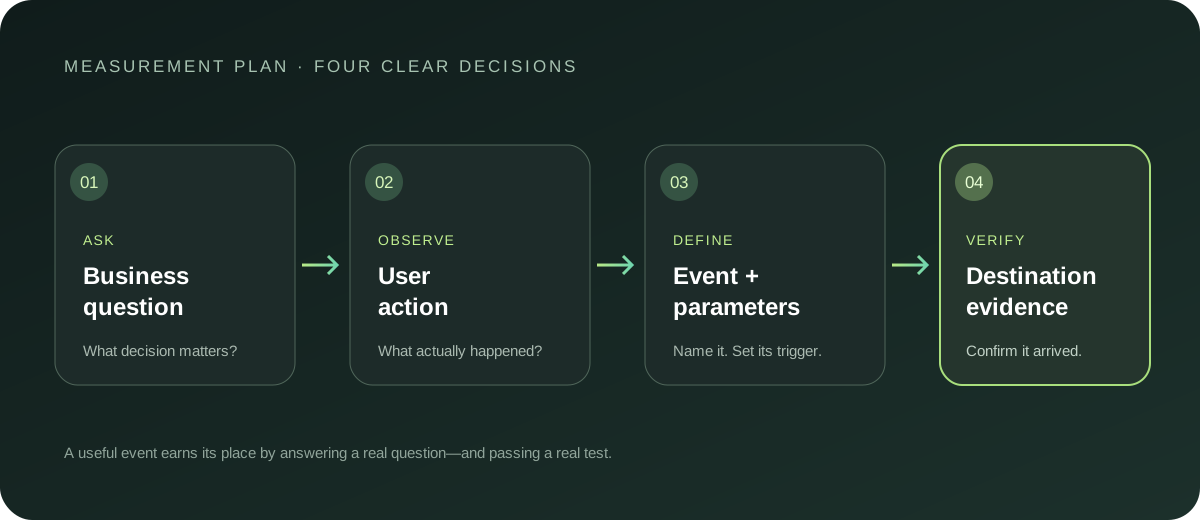
The most useful plan is not the longest one. Start with a decision the team needs to make: Which forms produce qualified enquiries? Where do people abandon signup? Which content helps a visitor reach a product page? Then select the few observable actions that answer it.
Map the journey into measurable actions
Write the journey in the language of the user first. A simple enquiry journey might be:
- A visitor begins — `form_start`: whether people engage with the form.
- A visitor submits successfully — `form_submit`: whether the form completes.
- A team qualifies the enquiry — `lead_qualified`: whether submissions become useful leads.
These are planning examples, not a universal GA4 schema. Check Google’s current recommended events reference and use a recommended event when its documented meaning fits. `generate_lead` is a GA4 recommended event for a lead-generation action; do not use it to mean a button click or an unqualified form attempt. If a recommended event does not fit, define a custom event and document the distinction.
Avoid tracking every click by default. An event earns its place when it has a clear meaning and supports a decision. More events can mean more maintenance, inconsistent definitions and harder analysis.
Specify each event so it can be implemented consistently
For every proposed event, document:
- Purpose: Which question or decision will this help with?
- Action: What did the person actually do?
- Trigger: What exact condition causes the event to fire?
- Name: Which stable event name is used?
- Parameters: What limited context helps interpret it?
- Destination: Where should it be sent?
- Owner and status: Who maintains it; is it proposed, testing, live or retired?
- Privacy review: Could the event or its values reveal personal information?
For example, “track the contact form” is ambiguous. A more testable definition is: fire `form_submit` once after the form service confirms a successful submission; do not fire it on button click, validation error or network failure.
Use a consistent naming style. Lowercase words separated by underscores are easy to scan, but the important rule is to agree and apply the convention across the implementation. Name the action, not the tag manager or team that happens to send it. Keep “started” and “completed” actions distinct when the difference matters.
Keep parameters useful and safe
Parameters add context to an event. For a form, a controlled `form_id` or `form_type` may distinguish enquiry forms from newsletter forms. A parameter is not useful simply because it can be collected: it should help someone filter, compare or interpret results.
Before adding one, ask whether its values are controlled and consistent, whether the same information is already available elsewhere, and whether it could contain a name, email address, phone number, free-text response or other personal information. Do not send personal or sensitive data to GA4. In particular, never pass form contents or user-entered text as analytics parameters.
Review privacy and consent as part of the plan
Record what information is collected, why it is necessary, which destinations receive it, and how your consent configuration affects collection or delivery. Minimise data and verify the actual behaviour in the deployed setup. Requirements differ by organisation and jurisdiction, so have the appropriate privacy owner review uncertain cases; this guide is measurement guidance, not legal advice.
QA before calling the event live
Test in a controlled environment and verify each event against the written definition:
- Perform the successful user journey and confirm the event fires once.
- Try validation failures and interrupted journeys; confirm completion events do not fire.
- Check the exact event name and each parameter value.
- Inspect payloads to make sure no personal or sensitive information is present.
- Test the expected consent state and destination configuration.
- Confirm the event reaches the intended GA4 property in a debugging or realtime view.
- Record the result, date and owner in the plan.
A deployed tag is not proof of a working event. Verify the complete path from user action to the intended destination. Use the Analytics Capture measurement plan to keep proposed events and implementation decisions organised.
Maintain the plan after launch
Treat the tracking plan as a living reference. Review it when a journey changes, when a destination is added, or when a report no longer supports its original decision. Mark old definitions retired instead of quietly reusing their names for new meanings.
A clear plan reduces guesswork before launch and makes later changes easier to review. Start small, test the real behaviour, and expand only when a new question needs better evidence.